



With the release of the Sitecore Content SDK, I’ve observed a significant shift in the way headless applications are being developed. I recently had the opportunity to work on a project implementing this approach. In this blog, I’ve captured all the key insights, relevant concepts, and technical details related to the Content SDK.
Headless JSS
Let’s do a basic recap of Headless JSS before we talk about Content SDK. Headless JSS refers to Sitecore’s JavaScript Services for building headless applications, which separate the head(front-end) application from the Backend (Sitecore CMS). This is the original toolkit Sitecore created for headless development. The key difference is that the JSS SDK was designed to be a one-size-fits-all solution. It had to support both the new, headless Sitecore AI and Sitecore’s older, all-in-one platform, Sitecore XP/XM. To do this, it had to include extra code and dependencies to support older features, like the “Experience Editor”. This makes the JSS SDK “bulkier” and more complex. If you’re only using Sitecore AI, you’re carrying around a lot of extra weight you simply don’t need.

Sitecore Content SDK
Sitecore has introduced the Content SDK for XM Cloud-now Sitecore AI, to streamline the process of fetching content and rendering it on modern JavaScript front-end applications. If you’re building a website on Sitecore AI, the new Content SDK is the modern, recommended tool for your development team. For developers, it provides GraphQL utilities to streamline data fetching and is deeply optimised for Next.js, enabling high-performance features like server-side rendering. Furthermore, with the recent introduction of App Router support (in beta), the SDK is evolving to give developers even more granular control over performance, SEO, bundle sizes, and security through a more modern, modular code structure.
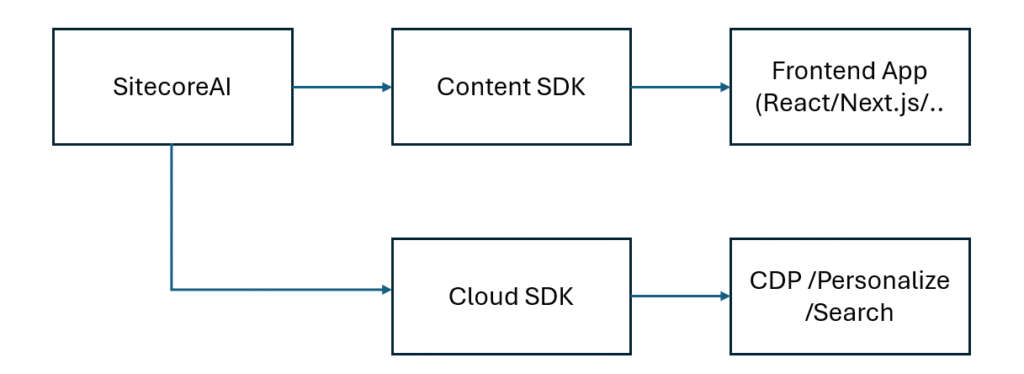
Key features
- Integration with SitecoreAI Pages for visual editing and testing of components.
- A Next.js JavaScript starter template for rapid integration and delivery.
- Personalization and component A/B/n testing integration with no custom coding required, allowing you to easily deploy multiple variants of a page to different audience categories (such as time zone or language), and test component variants among percentages of your total site visitors.
- Multi-site support for environments serving multiple independent sites.
- GraphQL utilizes common API queries to fetch content, presentation (layout) data, and other specialized Sitecore data such as site information and dictionaries.
- Framework-specific capabilities, such as Next.js locale-based routing for internationalization, and rendering methods like server-side rendering (SSR) and static site generation (SSG).
Sitecore Cloud SDK
Cloud SDK provides the following key features:
- Real-time, unified tracking – track site visitors’ behavior by capturing events on your site in real time. The event with all its data is sent to Sitecore and becomes available in the various Sitecore DXP products your organization has access to: SitecoreAI, Sitecore CDP, Sitecore Personalize, and Sitecore Search. Tracking capabilities are provided by the Cloud SDK events package.
- Personalization – show personalized content to site visitors. Personalization capabilities are provided by the Cloud SDK personalized package.
- Search experiences – build search experiences, such as a search results page or a recommendation component, and capture events that occur inside them. Search capabilities are provided by the Cloud SDK search package.
Benefits and features of Content SDK
1. App Router support
Next.js App Router introduces a clear separation of concerns between server and client components. In practice, this introduces the following benefits:
- Developers can fine-tune and better optimize the performance of their applications.
- Better control over the behavior and SEO of the site.
- More flexibility to control client bundle size.
- Improved security of the app.
With version 1.2.0, Sitecore Content SDK introduces App Router support in beta. While the full-fledged stable release is expected soon, developers can already start exploring its benefits and workflow with the 1.2 version.
This isn’t just a minor update; it’s a huge step toward making your front-end development more flexible and highly optimized.
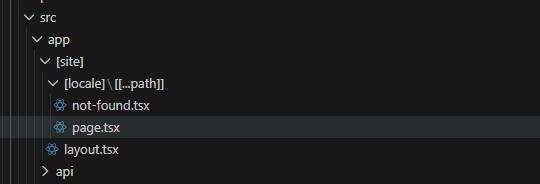
The App Router introduces a fantastic change to your starter application’s code structure and how routing works. Everything becomes more modular and declarative, aligning perfectly with modern architecture practices. This means defining routes and layouts is cleaner, content fetching is neatly separated from rendering, and integrating complex Next.js features like dynamic routes is easier than ever. Ultimately, this shift makes your applications much simpler to scale and maintain as they grow on Sitecore AI.
Performance: Developers can fine-tune route handling with nested layouts and more aggressive and granular caching to seriously boost overall performance, leading to faster load times.
Bundle Size: Smaller bundle size because it uses React Server Components (RSC) to render components. It helps fetch and render components from the server side without making static files in a bundle.
Security: It helps with security by giving improved control over access to specific routes and content.
With the starter kit applications, this is how the app router routing structure looks:
2. Configurations Deep Dive
In this section, we will talk about sitecore.config.ts and sitecore.cli.config.ts.
The sitecore.config.ts file, located in the root of your application, acts as the central configuration point for Content SDK projects. It is a replacement of the older temp/config file used by the JSS SDK. It contains properties that can be used throughout the application just by importing the file. It contains important properties like sitename, defaultLanguage, and edge props like contextid. Starter templates include a very lightweight version containing only the mandatory parameters necessary to get started. Developers can easily extend this file as the project grows and requires more specific settings.
Key Aspects:
Environment Variable Support: This file is designed for deployment flexibility using a layered approach. Any configuration property present in this file can be sourced in three ways, listed in order of priority:
- Explicitly defined in the configuration file itself.
- Fallback to a corresponding environment variable (ideal for deployment pipelines).
- Use a default value if neither of the above is provided.
This layered approach ensures flexibility and simplifies deployment across environments.
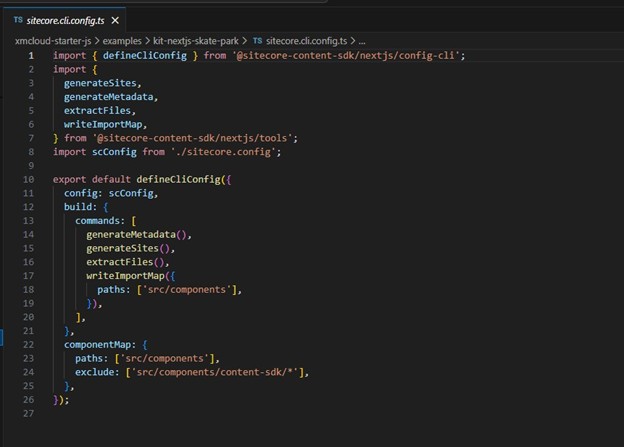
The sitecore.cli.config.ts file is dedicated to defining and configuring the commands and scripts used during the development and build phases of a Content SDK project.
Key Aspects:
CLI Command Configuration: It dictates the commands that execute as part of the build process, such as generateMetadata() and generateSites(), which are essential for generating Sitecore-related data and metadata for the front-end.
Component Map Generation: This file manages the configuration for the automatic component map generation. This process is crucial for telling Sitecore how your front-end components map to the content structure, allowing you to specify file paths to scan and define any files or folders to exclude. Explored further below.
Customization of Build Process: It allows developers to customize the Content SDK’s standard build process by adding their own custom commands or scripts to be executed during compilation.
While sitecore.config.ts handles the application’s runtime settings (like connection details to Sitecore AI), sitecore.cli.config.ts works in conjunction to handle the development-time configuration required to prepare the application for deployment.
3. Component Map
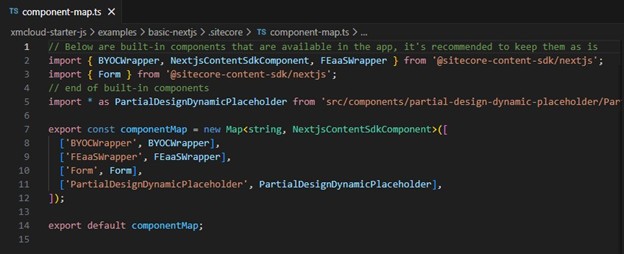
In Sitecore Content SDK-based applications, every custom component must be manually registered in the .sitecore/component-map.ts file located in the app’s root. The component map is a registry that explicitly links Sitecore renderings to their corresponding frontend component implementations. The component map tells the Content SDK which frontend component to render for each component received from Sitecore. When the rendering gets added to any page via presentation, the component map tells which frontend rendering should be rendered at the place.
Key Aspects:
Unlike JSS implementations that automatically map components, the Content SDK’s explicit component map enables better tree-shaking. Your final production bundle will only include the components you have actually registered and use, resulting in smaller, more efficient application sizes.
This is how it looks: (Once you start creating a custom component, you have to add the component name here to register.)
4. Import Map
The import map is a tool used specifically by the Content SDK’s code generation feature. It manages the import paths of components that are generated or used during the build process. It acts as a guide for the code generation engine, ensuring that any new code it creates correctly references your existing components.
Where it is: It is a generated file, typically found at ./sitecore/import-map.ts, that serves as an internal manifest for the build process. You generally do not need to edit this file manually.
It simplifies the logic of code generation, guaranteeing that any newly created code correctly and consistently references your existing component modules.
The import map generation process is configurable via the sitecore.cli.config.ts file. This allows developers to customize the directories scanned for components.
5. Define Middleware in the Sitecore Content SDK
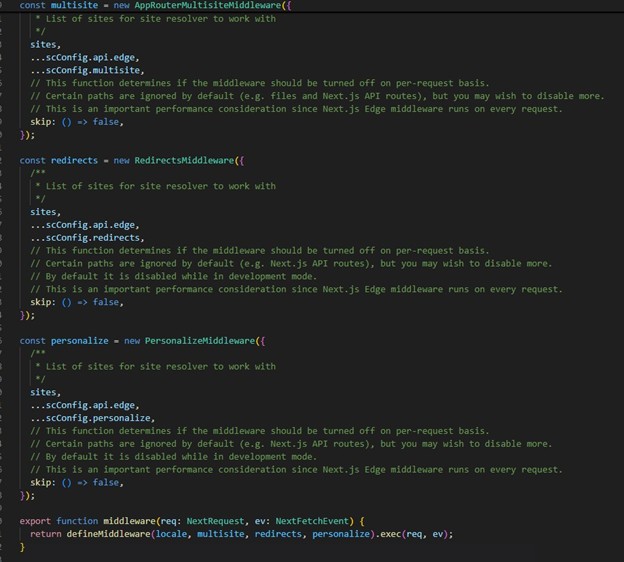
defineMiddleware is a utility for composing a middleware chain in your Next.js app. It gives you a clean, declarative way to handle cross-cutting concerns like multi-site routing, personalization, redirects, and security all in one place. This centralization aligns perfectly with modern best practices for building scalable, maintainable functions.
The JSS SDK leverages a “middleware plugin” pattern. This system is effective for its time, allowing logic to be separated into distinct files. However, this separation often requires developers to manually manage the ordering and chaining of multiple files, which could become complex and less transparent as the application grows. The Content SDK streamlines this process by moving the composition logic into a single, highly readable utility that can be customized easily by extending the Middleware.
6. Debug Logging in Sitecore Content SDK
Debug logging helps you see what the SDK is doing under the hood. Super useful for troubleshooting layout/dictionary fetches, multisite routing, redirects, personalization, and more. The Content SDK uses the standard DEBUG environment variable pattern to enable logging by namespace. You can selectively turn on logging for only the areas you need to troubleshoot, such as: content-sdk:layout (for layout service details) or content-sdk:dictionary (for dictionary service details).
7. Editing & Preview
In the context of Sitecore’s development platform, editing and preview render optimization with the Content SDK involves leveraging middleware, architecture, and framework-specific features to improve the performance of rendering content in editing and preview modes. The primary goal is to provide a fast and responsive editing experience for marketers using tools like Sitecore AI Pages and the Design Library. EditingRenderMiddleware: The Content SDK for Next.js includes optimized middleware for editing scenarios. Instead of a multi-step process involving redirects, the optimized middleware performs an internal, server-side request to return the HTML directly. This reduces overhead and speeds up rendering significantly.
This feature works out of the box in most environments: Local container, Vercel / Netlify, SitecoreAI (defaults to localhost as configured)
For custom setups, override the internal host with: SITECORE_INTERNAL_EDITING_HOST_URL=https://host
This leverages an Integration with XM Cloud/Sitecore AI Pages for visual editing and testing of components.
8. SitecoreClient
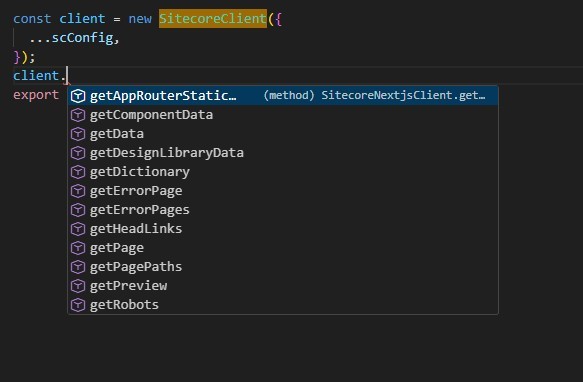
The SitecoreClient class in the Sitecore Content SDK is a centralized data-fetching service that simplifies communication with your Sitecore content backend, typically with Experience Edge or preview endpoint via GraphQL endpoints.
Instead of calling multiple services separately, SitecoreClient lets you make one organized request to fetch everything needed for a page layout, dictionary, redirects, personalization, and more.
Key Aspect:
Unified API: One client to access layout, dictionary, sitemap, robots.txt, redirects, error pages, multi-site, and personalization.
9. Built-In Capabilities for Modern Web Experiences
GraphQL Utilities: Easily fetch content, layout, dictionary entries, and site info from Sitecore AI’s Edge and Preview endpoints.
Personalization & A/B/n Testing: Deploy multiple page or component variants to different audience segments (e.g., by time zone or language) with no custom code.
Multi-site Support: Seamlessly manage and serve content across multiple independent sites from a single Sitecore AI instance.
Analytics & Event Tracking: Integrated support via the Sitecore Cloud SDK for capturing user behavior and performance metrics.
Framework-Specific Features: Includes Next.js locale-based routing for internationalization, and supports both SSR and SSG for flexible rendering strategies.
10. Cursor for AI development
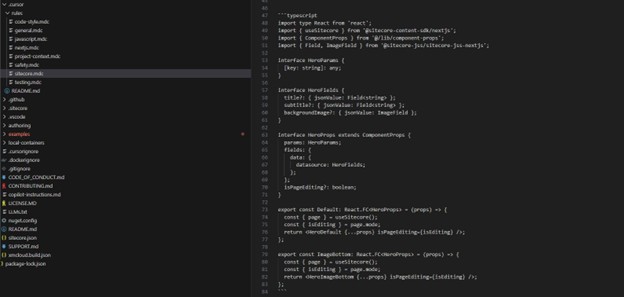
Starting with Content SDK version 1.1, Sitecore has provided comprehensive “Cursor rules” to facilitate AI-powered development.
The integration provides Cursor with sufficient context about the Content SDK ecosystem and Sitecore development patterns. This set of rules and context helps to accelerate the development. The cursor rules are created for contentsdk with the starter application under the .cursor folder. This enables the AI to better assist developers with tasks specific to building headless Sitecore components, leading to improved development consistency and speed, following the same patterns just by providing a few commands in generic terms. An example given in the screenshot below for the Hero component, which can act as a pattern to create another similar component by cursor.
11. Starter Applications in examples
basic-nextjs -A minimal Next.js application showcasing how to fetch and render content from Sitecore AI using the Content SDK. Ideal for SSR/SSG use cases and developers looking to build scalable, production-ready apps.
basic-spa -A single-page application (SPA) example that demonstrates client-side rendering and dynamic content loading. Useful for lightweight apps or scenarios where SSR is not required.
Other demo site to showcase Sitecore AI capabilities using the Content SDK:
- kit-nextjs-article-starter
- kit-nextjs-location-starter
- kit-nextjs-product-starter
- kit-nextjs-skate-park
Conclusion
The Sitecore Content SDK represents a major leap forward for developers building on Sitecore AI. Unlike the older JSS SDK, which carried legacy dependencies, the Content SDK is purpose-built for modern headless architectures—lightweight, efficient, and deeply optimized for frameworks like Next.js. With features like App Router support, runtime and CLI configuration flexibility, and explicit component mapping, it empowers teams to create scalable, high-performance applications while maintaining clean, modular code structures.