



Recently, I attended a session with Sitecore and had the opportunity to attend a session on Performance Optimization in XM Cloud. Based on my experience working on a Sitecore headless architecture project and setting up various rendering hosts and pages.
For context, performance is one of the biggest differentiators in modern, composable DXP architecture. With Sitecore XM Cloud at the center of today’s headless, globally distributed experience platforms, engineering teams must ensure optimal performance across GraphQL delivery, publishing pipelines, network operations, and rendering logic.
This blog consolidates learnings XM Cloud Performance session, combined with real-world implementation insights from enterprise projects. These optimizations not only improve site speed but also reduce costs, enhance marketer experience, and ensure scalability across regions. Aiming for performance is important, but there are factors such as Money, Effort, and Knowledge involved in performance benchmarking, so maintaining the balance between these three is critical. Balance is the Key.
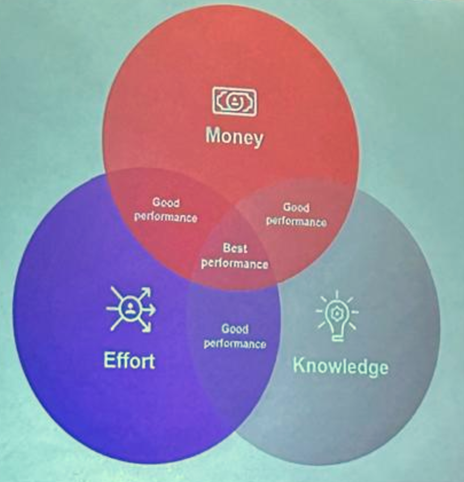
Performance Framework
When we talk about performance, there are multiple components involved in the considerations. XM Cloud performance optimization revolves around four pillars:
- Network performance
- GraphQL performance
- Network performance
- Publishing pipeline performance
- Code execution and rendering performance
These pillars ensure every request—from editorial preview to public content delivery—moves efficiently through XM Cloud and Experience Edge.
Network performance: Editor
In a fully headless, cloud-native architecture like Sitecore XM Cloud, network performance becomes one of the largest and often most hidden contributors to latency.
Unlike traditional CMS architecture,s where rendering and content retrieval happen inside a single controlled environment, XM Cloud distributes responsibilities across:
- Global CDNs (Sitecore Experience Edge + customer’s CDN)
- Rendering Host (Next.js / Vercel / Azure)
- WAF / Firewalls / Corporate VPN
- Marketing tools & integrations
- Content Authoring Interfaces (Pages, Component Builder, XM Cloud Dashboard)
Every hop across this network path affects performance.
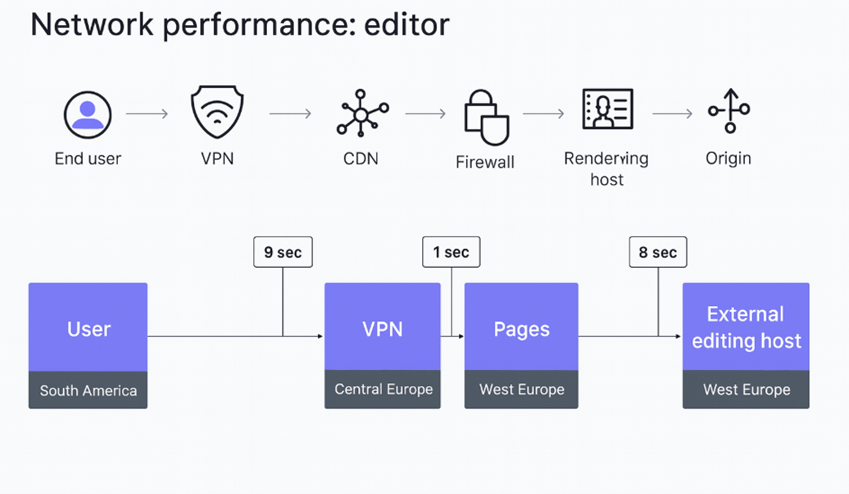
The above diagram illustrates how network routing affects the experience of content authors using Pages, Component Builder, or Content Editor in XM Cloud.
Unlike end users — whose requests are optimized through global CDNs — editors interact directly with backend systems, making them much more sensitive to network latency.
The diagram shows actual latency numbers observed from real-world Sitecore telemetry:
- 9 seconds delay from editor → VPN
- 1 second from VPN → Pages App
- 8 seconds from Pages App → External Editing Host
Total potential latency = ~18 seconds
This is not due to XM Cloud directly, but due to the network architecture. It’s important to dig deeper into to setup and rule out problem areas.